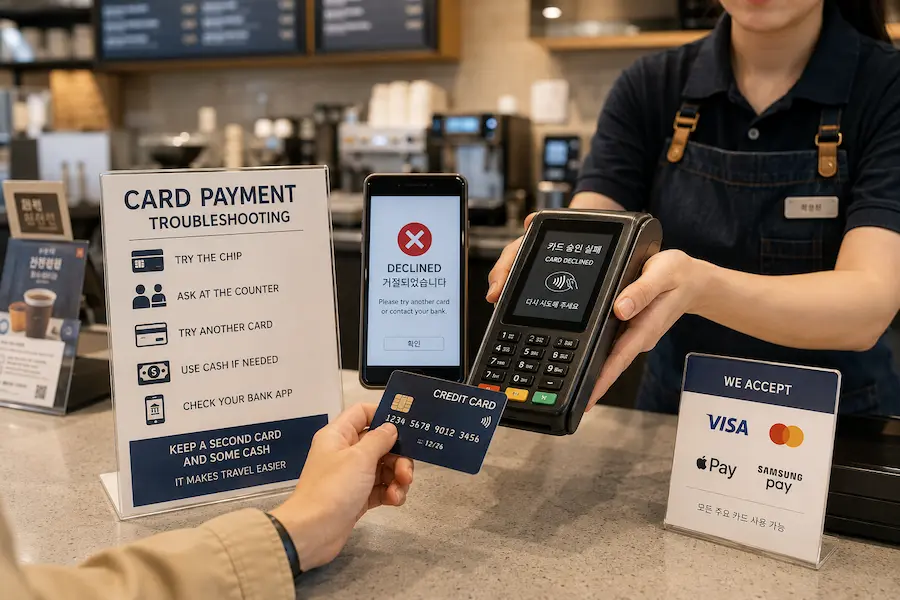
Foreign-issued cards are widely accepted in Korea. Hotels, department stores, convenience stores, restaurants, cafés and many ordinary shops routinely accept card payments.
Still, no single card is guaranteed to work at every shop, kiosk, ticket machine, ATM or Korean website.
A card that worked earlier in the day may fail at the next place. This does not necessarily mean the card is damaged or blocked. The problem may involve the merchant’s terminal, the kiosk’s payment system, the card network, the card issuer’s security controls or the type of transaction being attempted.
I have used a foreign-issued card alongside a Korean card in Korea.
Many years ago, I occasionally encountered a shop where my foreign card did not work, so I used my Korean card instead. More recently, I have rarely had trouble paying with a foreign card.
On some occasions, a staff member first tried to process the payment and then asked whether the card had been issued overseas. After I confirmed that it had, the staff member explained that the shop’s terminal could not process that foreign card.
A declined payment is inconvenient, but it is usually manageable when you check one possibility at a time.
Quick Answer: What Should You Do First?
When your foreign card does not work in Korea, follow this order:
- Confirm that the payment really failed.
- Try inserting the card’s chip if contactless payment failed.
- Ask whether the shop accepts foreign-issued cards.
- Ask whether you can pay at a staffed counter.
- Try a different card.
- Use Korean won if cash is accepted.
- Check your banking app for a security alert or card lock.
- Contact the card issuer if the card fails at several unrelated businesses.
For a broader guide to cards, cash, ATMs and everyday payments, see our Paying in Korea guide.
Do not repeat the same payment many times before checking whether one attempt has already been authorised.
First, Confirm Whether the Payment Went Through
A terminal may beep, display a Korean message or briefly show an error screen. Before trying again, confirm the result with the staff member.
Ask:
결제된 건가요?
Gyeoljedoen geongayo?
Did the payment go through?
Check whether:
- the merchant’s screen shows an approved payment;
- a receipt was printed;
- the order was completed;
- the cashier confirms that payment was received;
- your banking app shows a pending or completed transaction.
A card notification alone does not always prove that the merchant completed the sale.
Your card app may show that an amount has been authorised or temporarily reserved while the merchant’s terminal shows that the sale was not completed. Confirm the merchant’s result before paying again.
Ask Whether Foreign Cards Are Accepted
Some businesses may not be able to process every foreign-issued card.
The staff member may not realise that your card was issued overseas until the first attempt fails.
Ask:
해외카드 결제돼요?
Haeoe kadeu gyeoljedwaeyo?
Do you accept foreign cards?
The staff member may explain that:
- the shop does not process foreign-issued cards;
- the current terminal does not support that card;
- only certain card networks are accepted;
- another terminal may work;
- counter payment is available;
- another card or cash is needed.
A merchant can tell you what appeared on its payment terminal, but it may not know the precise reason your card issuer declined the transaction.
When the card fails at several unrelated businesses, the card issuer is the best place to ask for the exact reason.
Try the Chip If Contactless Payment Fails
Contactless payment and chip payment are not always processed in exactly the same way.
If tapping the card does not work:
- Insert the card into the chip reader.
- Leave it in the terminal.
- Follow any PIN or signature request.
- Remove the card only when the terminal or staff member tells you to do so.
A failed tap does not necessarily mean that the physical card cannot be used.
If the chip also fails, avoid repeatedly trying the same method without checking the result.
The Kiosk May Fail While the Counter Works
A foreign card may be rejected by a self-service kiosk even when a staffed counter at the same business can process it.
This may happen at:
- restaurants and cafés;
- cinemas;
- ticket machines;
- car parks;
- unmanned shops;
- coin laundries;
- transport machines;
- attraction ticket kiosks.
Before leaving, ask:
카운터에서 결제할 수 있어요?
Kaunteoeseo gyeoljehal su isseoyo?
Can I pay at the counter?
A staff member may be able to:
- enter the order manually;
- use another payment terminal;
- accept a different card;
- take cash;
- explain which payment methods are supported.
If the shop is completely unattended, look for a customer-service number or payment notice near the machine.
For more help with restaurant ordering machines, read What to Know Before Using a Korean Restaurant Kiosk.
Try a Different Card
Two foreign-issued cards can produce different results at the same terminal.
A second card may work because it:
- uses another payment network;
- was issued by a different bank;
- has different overseas-use settings;
- has not triggered a security check;
- has a higher available balance or spending limit;
- supports the transaction type being used.
Travelling with two cards is safer than relying on only one.
When possible, use cards issued by different banks or operating on different card networks. Keep them in separate places so that losing one wallet does not remove every payment option.
Check Your Banking App
If the merchant normally accepts foreign cards but your payment is declined, check the official app from your bank or card issuer.
Look for:
- a fraud or security alert;
- a request to approve the transaction;
- a locked or frozen card;
- overseas payments being disabled;
- contactless or online payments being disabled;
- a daily spending limit;
- insufficient available funds;
- an expired card;
- an unusual transaction warning.
Some issuers may pause a transaction until the cardholder confirms that it is genuine.
After approving a transaction in the app, tell the staff member before trying again. Do not continue making repeated attempts while the card remains locked.
When Should You Contact the Card Issuer?
Contact your card issuer when:
- the card fails at several unrelated businesses;
- a card that was working suddenly fails everywhere;
- your banking app shows a security restriction;
- you cannot enable overseas transactions;
- you see a transaction you do not recognise;
- the available balance appears incorrect;
- the card is retained by an ATM;
- duplicate completed charges remain;
- you cannot determine why the transaction was declined.
The merchant can explain the message shown on its terminal, but the card issuer has access to the card account and authorisation result.
Use the contact information in the official banking app or on the back of the card.
Do not call a number sent in an unexpected text message asking for card details.
Visa advises cardholders to contact their issuing bank for the specific reason a Visa card was declined. Official Visa support is available at Visa Consumer Support.
What If You Receive an Approval Notification?
You may receive a banking notification even though the cashier says that payment failed.
Do not immediately pay again.
Ask the merchant to confirm:
- whether the terminal shows approval;
- whether a receipt was created;
- whether the order is marked as paid;
- whether the transaction was cancelled;
- whether another payment attempt is necessary.
Then check the transaction status in your banking app.
It may appear as:
- pending;
- authorised;
- completed;
- reversed;
- cancelled.
The wording differs between banks.
A pending transaction usually means that an amount has been reserved but has not yet become a final completed charge. The time needed for a pending transaction to complete or disappear depends on the merchant, card network and issuer.
Keep the following information until the status is clear:
- the merchant name;
- the date and time;
- the amount;
- the payment receipt or failure slip;
- a screenshot of the card notification;
- the last four digits of the card used.
If a transaction becomes a completed charge even though the merchant confirms that the sale failed, contact the merchant and the card issuer.
What If the Same Amount Appears Twice?
Seeing the same amount twice does not always mean that you have been charged twice.
Possible situations include:
- one completed payment and one pending authorisation;
- two pending attempts;
- one cancelled transaction and one completed payment;
- two genuinely completed charges.
First, check the status of each entry.
One completed and one pending
The pending entry may later disappear or be reversed. Keep the receipt and monitor the transactions.
Both entries are pending
Wait for the issuer’s normal pending-transaction process, but keep evidence of the attempted payments.
Both entries are completed
Contact the merchant first and ask whether two payments were received.
If the merchant cannot correct the duplicate charge, contact the card issuer and follow its dispute procedure.
Do not assume that every duplicate-looking entry will resolve in the same number of days. Processing times vary by issuer and transaction type.
Why Can Online Payments Be More Difficult?
A foreign card that works in a physical Korean shop may still fail on a Korean website or app.
Online payment can involve additional requirements, such as:
- acceptance of Korean-issued cards only;
- Korean mobile-phone verification;
- a local account or membership;
- a Korean billing-address format;
- additional cardholder authentication;
- support for only certain overseas cards;
- a payment window that does not work well in the app or browser.
These restrictions are not universal. They depend on the service and payment provider.
For example, some Korean reservation platforms offer a separate global service because their domestic version may require local verification or may not support every international card.
When online payment fails, try:
- The service’s official global or English-language website.
- A desktop browser instead of the app.
- Another card.
- A staffed ticket office or physical counter.
- Payment at the venue, when available.
- An authorised international booking service.
- Asking your accommodation or the Korea Travel Helpline for guidance.
Do not send your full card number, expiry date and security code to a business through ordinary email or chat.
Transport Card Top-Ups Follow Separate Rules
A foreign bank card and a Korean transportation card are not the same payment system.
Even when your foreign card works in shops, it may not work for every transportaion-card purchase or recharge.
In Seoul, selected new ticket machines on Subway Lines 1-8 now accept supported overseas cards for single-journey tickets and short-term Climate Card products. This does not mean that every transportation card, recharge machine or transport system across Korea accept foreign cards.
For the latest Seoul-specific payment options, see the Seoul Metropolitan Government’s official notice.
Do not assume that a credit card can be used simply because the transportation card was purchased at a convenience store.
For more information, read:
- How Korean Transportation Cards and Transfer Rules Work
- First Day in Korea: Transport, Maps, Payments and Arrival Tips
- How Korean Convenience Stores Work as Everyday Service Hubs
What About ATMs?
Not every Korean ATM accepts every foreign-issued card.
Look for an ATM showing:
- Global ATM;
- International ATM;
- an international card-network logo matching your card;
- an English-language option.
International-card ATMs may be found at:
- airports;
- banks;
- convenience stores;
- major stations;
- shopping centres.
Before confirming a withdrawal, check:
- the withdrawal amount;
- the ATM operator’s fee;
- your card issuer’s cash-withdrawal fee;
- the exchange-rate option;
- your daily withdrawal limit.
If one ATM rejects the card, it may be a machine compatibility issue rather than a full card block.
Try a Global ATM from another bank. If the card fails at several machines, contact the card issuer.
If an ATM retains your card, use the contact number displayed on the machine immediately and record the ATM location and identification number.
Mastercard cardholders can also use the official Mastercard ATM Locator.
Should You Carry Cash in Korea?
You do not need to carry a large amount of cash, but a small backup amount is practical.
Cash can help when:
- a small business does not accept your foreign card;
- a payment terminal is temporarily unavailable;
- a transportation-card recharge requires cash;
- a street stall accepts cash only;
- an unattended machine rejects the card;
- the card issuer temporarily blocks a transaction.
Keep backup cash separate from your main wallet.
Korea Tourism Organization states that credit cards are widely used at Korean businesses, including major hotels, department stores and general shops. Its official currency and payment guide is available at Korean Currency and Exchange Information.
The purpose of carrying cash is not to replace card payments. It is to make one failed transaction easier to handle.
Useful Korean Phrases
| Korean | Pronunciation | Meaning |
|---|---|---|
| 해외카드 결제돼요? | Haeoe kadeu gyeoljedwaeyo? | Do you accept foreign cards? |
| 카드가 안 돼요. | Kadeuga an dwaeyo. | The card is not working. |
| 다른 카드로 결제할게요. | Dareun kadeuro gyeoljehalgeyo. | I will pay with another card. |
| 카운터에서 결제할 수 있어요? | Kaunteoeseo gyeoljehal su isseoyo? | Can I pay at the counter? |
| 현금으로 결제할게요. | Hyeongeumeuro gyeoljehalgeyo. | I will pay in cash. |
| 결제된 건가요? | Gyeoljedoen geongayo? | Did the payment go through? |
| 취소된 건가요? | Chwisodoen geongayo? | Was it cancelled? |
| 영수증을 확인해 주세요. | Yeongsujeungeul hwaginhae juseyo. | Please check the receipt. |
| 두 번 결제됐나요? | Du beon gyeoljedwaennayo? | Was I charged twice? |
When speaking is difficult, showing the Korean sentence on your phone is usually enough.
What to Prepare Before Travelling
Before arriving in Korea:
- confirm that overseas transactions are enabled;
- install the card issuer’s official app;
- make sure you can receive security alerts;
- save the issuer’s international contact information;
- check the card’s expiry date;
- know your PIN;
- bring a second card;
- carry a small amount of Korean won;
- keep cards and backup cash in separate places.
Do not store the PIN with the card.
Avoid keeping an unprotected photograph showing the full card number, expiry date and security code.
Quick Decision Guide
The card fails once at a small shop
Ask whether foreign cards are accepted. Then use another card or cash.
Contactless payment fails
Insert the card’s chip and follow the terminal instructions.
The kiosk rejects the card
Ask whether you can pay at a staffed counter.
One card fails but another works
Complete the purchase with the working card and check the first card later.
The card fails at several shops
Check the banking app and contact the card issuer.
You receive a notification but the shop says payment failed
Confirm the merchant’s result before paying again. Keep the receipt and monitor the transaction status.
The same amount appears twice
Check whether each entry is pending or completed before reporting a duplicate charge.
A Korean website rejects the card
Look for an official global site, try another card or use a staffed or authorised alternative.
You need cash
Look for a Global or International ATM displaying your card network.
Frequently Asked Questions
Are foreign cards widely accepted in Korea?
Yes. International cards are widely accepted at hotels, department stores, restaurants, convenience stores and many other businesses. Acceptance is not guaranteed at every small shop, kiosk, unattended machine, ATM or online payment page.
Why does my card work at one shop but not another?
The businesses may use different terminals, payment providers or supported card networks. A failure at one shop does not necessarily mean that the card is blocked.
Can a kiosk reject a card that works at the counter?
Yes. A kiosk and a staffed counter may use different payment arrangements. Ask whether the staff can process the payment separately.
Should I try the same card several times?
One careful retry may be reasonable, especially when changing from contactless to chip. Do not make repeated attempts when the transaction result is unclear.
What should I do if I receive a notification but the shop says payment failed?
Ask the merchant to confirm whether payment was approved. Keep any receipt and check whether the transaction is pending or completed. Contact the issuer if an incorrect completed charge remains.
Do I need cash in Korea?
Most visitors can pay for many daily purchases by card, but carrying a small amount of Korean won is useful for card failures, some transportation-card top-ups and cash-only businesses.
Will every Korean ATM accept my card?
No. Look for a Global or International ATM displaying your card’s network. Acceptance, withdrawal limits and fees vary.
Should I notify my bank before travelling?
This depends on the card issuer. Check its official travel guidance and make sure overseas transactions are enabled before departure.
Official Help
- Korea Tourism Organization: Korean Currency and Exchange Information
- Visa Consumer Support
- Visa Lost or Stolen Card Support
- Mastercard Global Support
- Mastercard ATM Locator
For travel assistance in Korea, the Korea Tourism Organization’s 1330 Korea Travel Helpline can also help visitors find official travel information and local support options.
Final Thoughts
A foreign card being declined in Korea does not automatically mean that the card is unusable.
The problem may involve the shop’s terminal, a kiosk, an online verification requirement or the card issuer’s security controls.
Start with the simplest steps.
Confirm whether the payment actually failed. Try the card’s chip. Ask whether foreign-issued cards are accepted. Request counter payment. Use another card or cash when necessary.
When the card fails at several unrelated businesses, check the banking app and contact the issuer.
Most importantly, do not depend on only one payment method.
A second card and a small amount of Korean won can turn a stressful payment failure into a minor inconvenience.